

Solana Yellowstone gRPC on ERPC: First Update and Monitoring Design

When Solana updates arrive earlier and can be processed immediately, an application can start recalculating prices or evaluating alerts sooner. For example, a service that detects a transaction from its logs and then retrieves the transaction body still has a retrieval step after the notification arrives. Yellowstone gRPC can deliver the body and execution results together and filter updates before transmission, reducing these additional requests and the processing of unwanted data. 4 8
ERPC describes Geyser gRPC as a lower latency delivery path than WebSocket based on customer feedback. This guide explains how it works and when to choose it. 1
To try the connection first, go to the one-update sample in Chapter 3. The sample receives one Clock sysvar update, prints fields such as its public key and data length, and exits. Refer to Chapter 2 when choosing a target, and Chapters 4–6 when designing a continuous client.
1. What Yellowstone delivers, and when
A Solana account is a unit of stored data identified by an address. Transaction execution can update balances or data managed by a program. Geyser is the plugin mechanism that exposes account updates and transaction execution information outside a node. Yellowstone gRPC selects that information according to subscription filters and continuously delivers it to connected applications. 2 3 4
gRPC lets an application call functions provided by a service on another server. A Yellowstone subscription opens a bidirectional stream over HTTP/2: the application specifies its targets in a
SubscribeRequest, then continuously receives matching updates. Filtering before delivery reduces unwanted data transfer and selection work in the application. The messages use Protocol Buffers to read and write defined fields and types in a binary format. Compact representation and efficient decoding are benefits of that format. Actual arrival differences also depend on the source, payload volume, network, and client processing. 4 18 24 26The ordinary live stream carries transactions executed by the node and account state written by that node.
accounts delivers account data, transactions delivers transaction bodies and execution metadata, and transactions_status delivers execution results without transaction bodies. Interpreting a pool price or a trade requires decoding this data according to the program's specification. 2 4The standard WebSocket
logsSubscribe method delivers a signature, execution error, and logs. If you also need the transaction body, retrieve it separately through getTransaction or another source. When a Yellowstone transaction subscription provides the required information, it can reduce this additional retrieval work. By comparison, accountSubscribe includes account data itself, so inspecting account state does not inherently require another RPC call. WebSocket is also a practical choice for displaying a few accounts in a browser. 4 6 8 20Alongside delivery speed, choose a
commitment, which specifies the certainty required for the state you use. As of November 2026, the Solana documentation describes confirmed as a compatibility value that returns the same state as finalized. For new application designs, choose between the following two according to the use case. 5| Purpose | Commitment | How the application treats the data |
|---|---|---|
| Display or analyze early changes that can be corrected later | processed | Receive provisional state and correct or discard state that is not adopted |
| Use finalized state, or operate without provisional state handling | finalized | Wait for finality before adopting the state, then validate the content required by the business action |
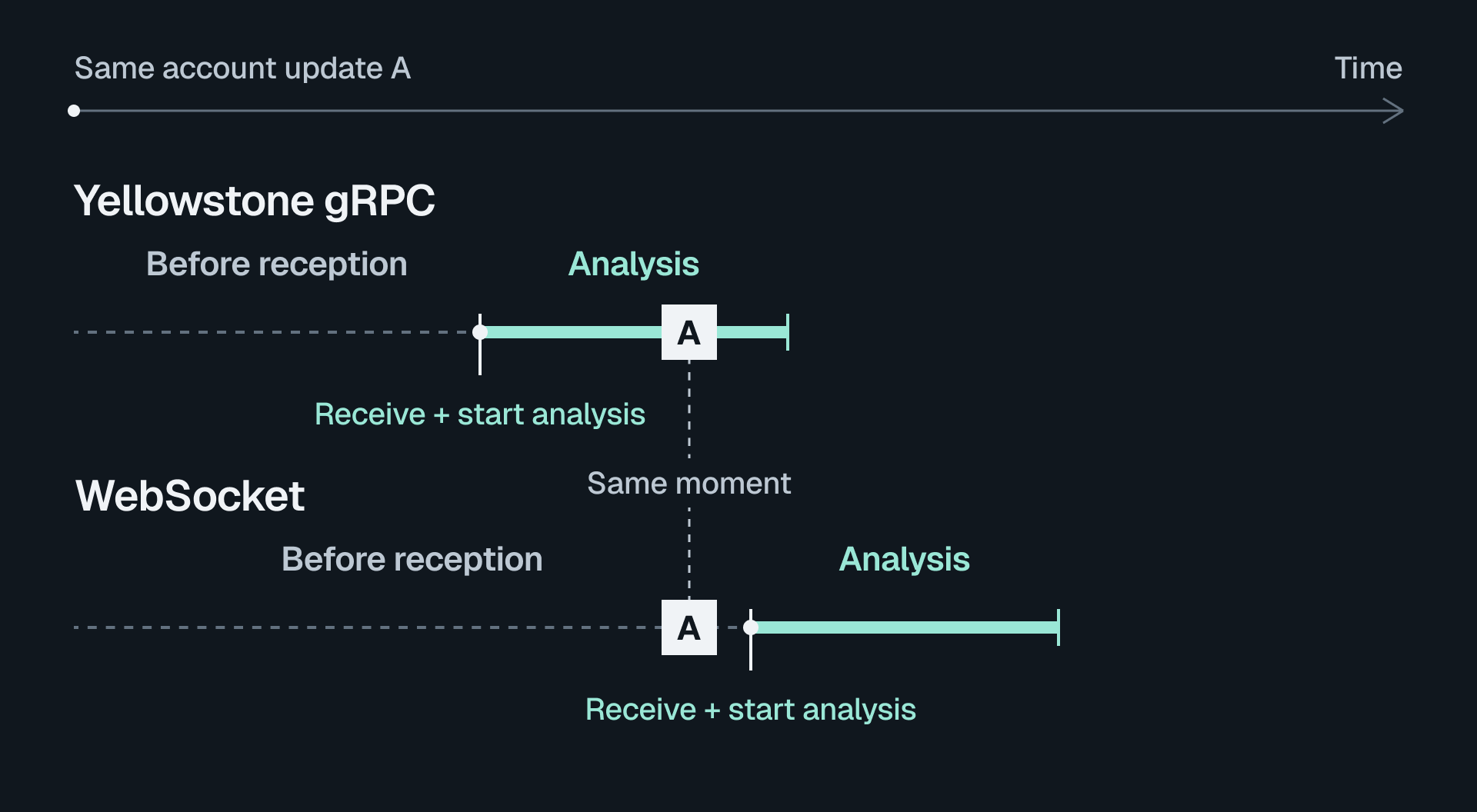
Earlier reception allows an earlier start
2. Choose a small subscription for your use case
Choose the retrieval method according to whether you need to read a current value once, follow state changes, or record individual transactions. Identifying the required information first also helps narrow the subscription. 4 6 9
| What you need to know | Start with | How to fit it to the use case |
|---|---|---|
| An account's current state once | HTTP RPC getAccountInfo | Use it for an initial view or for a current-state reference during recovery |
| Changes to a few accounts in a browser | WebSocket accountSubscribe | Update the display from the data in the notification |
| Changes to a specific account on a server | gRPC accounts | Begin with one address |
| Related transaction bodies, logs, and balance changes | gRPC transactions | Filter by relevant addresses, then interpret instructions and execution results |
| Lightweight transaction execution results | gRPC transactions_status | Filter by target addresses when transaction bodies and logs are unnecessary |
For
accounts, specify the address of the account whose updates you want. A mint identifies a token, a wallet represents the user, and a token account holds a token balance. To monitor a user's token balance, target the token accounts for that wallet and mint. A wallet can have several token accounts for the same mint. 10If you know the wallet and mint, send
getTokenAccountsByOwner to an HTTP RPC endpoint on the same Solana network as the subscription target. On ERPC, use the Edge RPC URL and API key for this lookup. Unlimited Endpoint does not support this method. Follow the Edge RPC connection instructions, keeping this configuration separate from the gRPC URL and IP authentication. Pass three parameters in order: the wallet public key, { "mint": "TARGET_MINT_PUBLIC_KEY" }, and { "encoding": "base64", "commitment": "finalized" }. Explicitly selecting base64 avoids the account-data size limit of the legacy default encoding. 23 27The pubkeys in
result.value identify the token accounts for that wallet and mint at query time. Sum the token balances decoded from their account data, keeping lamports, the SOL amount in its smallest unit, separate. An address-based subscription does not discover new token accounts. For current balances, one design is to refetch this list periodically and update subscription targets from differences in the set of public keys. This does not capture accounts created and closed between fetches or provide a complete history of updates. 10 23The
owner filter in an account subscription refers to the program that owns the account. This differs from the owner inside token account data, which identifies the authority controlling its balance. Specifying one account directly makes the initial reception check easier and avoids unintentionally broadening the target through this distinction. 3 10 113. Confirm success with an update for the intended account
ERPC operates the Solana node, while you run a subscription client on your server. Use the gRPC URL shown in the Dashboard and register your host's outgoing IP. Do not add
x-token or Authorization unless the particular product instructs you to do so. 1 13ERPC Shared rejects any nonempty
blocks map, even with a narrowed target. Each account filter requires account, owner, or a supported cuckoo filter; memcmp or datasize alone does not qualify. This guide specifies one account directly. Transaction subscriptions also need target addresses; do not use empty filters or high-volume addresses that Shared does not permit. Check Chapter 5 and the current FAQ for address-count limits and rejection reasons. 13A slot numbers a Solana block production opportunity. The same account can change several times within one slot, so a slot is not a sequence number for each update. Inspect the pubkey, slot, owner, and data length to confirm that a live update for the target has arrived. 2 14
This command-line sample receives one update and exits. It has been checked with the pinned SDK and a local mock gRPC server; connection and delivery on an actual ERPC endpoint have not been verified.
Download the implementation examples, extract the ZIP, and open a terminal in
first-account/. If you do not yet have a target, start with the Clock sysvar, which holds the current slot and other cluster time data. It also appears in the official Yellowstone subscription example. You do not need to move funds to generate test activity. 21 22Local validation used Node.js 24.22.3 and pnpm 11.25.0. Run the following in bash, replacing
ERPC_GRPC_URL with your Dashboard URL. The sample pins @validators-dao/solana-stream-sdk to 4.0.0 and its Yellowstone client to 10.0.0.bash
pnpm install --frozen-lockfile
pnpm build
export ERPC_GRPC_URL='https://YOUR_DASHBOARD_GRPC_ENDPOINT'
export ACCOUNT_PUBLIC_KEY='SysvarC1ock11111111111111111111111111111111'
pnpm start
pnpm install --frozen-lockfile
pnpm build
export ERPC_GRPC_URL='https://YOUR_DASHBOARD_GRPC_ENDPOINT'
export ACCOUNT_PUBLIC_KEY='SysvarC1ock11111111111111111111111111111111'
pnpm startThe full sample waits for
connect() before opening subscribe(request). The following part defines the subscription. It requests one target under accounts and observes it at PROCESSED commitment.typescript
export function accountRequest(account: string): SubscribeRequest {
  return {
    accounts: { watched: { account: [account], owner: [], filters: [] } },
    slots: {}, transactions: {}, transactionsStatus: {},
    blocks: {}, blocksMeta: {}, entry: {}, blockFooter: {},
    accountsDataSlice: [],
    commitment: CommitmentLevel.PROCESSED,
  };
}
export function accountRequest(account: string): SubscribeRequest {
return {
accounts: { watched: { account: [account], owner: [], filters: [] } },
slots: {}, transactions: {}, transactionsStatus: {},
blocks: {}, blocksMeta: {}, entry: {}, blockFooter: {},
accountsDataSlice: [],
commitment: CommitmentLevel.PROCESSED,
};
}Entries such as
blocks: {} in this request mean that the category is not subscribed to. This differs from a named filter without a target, such as accounts: { watched: {} }. You do not need to subscribe to all accounts or all transactions to check that reception works.On success,
event is first_live_account and isStartup is false. The callback checks that the pubkey matches the request and that the update is not a startup snapshot. The output keeps slot, lamports, and writeVersion as strings to preserve 64-bit integer precision. The following excerpt illustrates the output format; it is not a measured log.json
{
  "event": "first_live_account",
  "pubkey": "SysvarC1ock11111111111111111111111111111111",
  "slot": "<received slot>",
  "owner": "<owner program public key>",
  "dataLength": 40,
  "isStartup": false
}
{
"event": "first_live_account",
"pubkey": "SysvarC1ock11111111111111111111111111111111",
"slot": "<received slot>",
"owner": "<owner program public key>",
"dataLength": 40,
"isStartup": false
}The default observation deadline is 15 seconds from the start of connection establishment and can be changed with
OBSERVE_TIMEOUT_MS. End of stream (EOF), deadline expiry, and errors produce observation_failed and a nonzero exit code. A Ping, another account, or a startup snapshot alone cannot produce success. If no update arrives, investigate target activity and subscription conditions too. Before trying again after an error, follow Chapter 5's guidance on the earliest retry time and the action required for that error.isStartup: false does not mean finalized. The sample does not implement price decoding, continuous measurement, storage, reconnection, or replay. Chapters 4–6 describe the design work to add when building a continuous client.If you also follow transactions, distinguish
account_include, which matches A or B, from account_required, which requires both A and B. The presence of an address does not establish that a trade succeeded. The appendix, “Reading Transaction Filters”, provides combinations, matching examples, and the TypeScript property names used by the pinned SDK. 11Official quickstart, including Rust: https://erpc.global/en/doc/geyser-grpc/quickstart/ 12
4. Measure processing delays and keep up with incoming updates
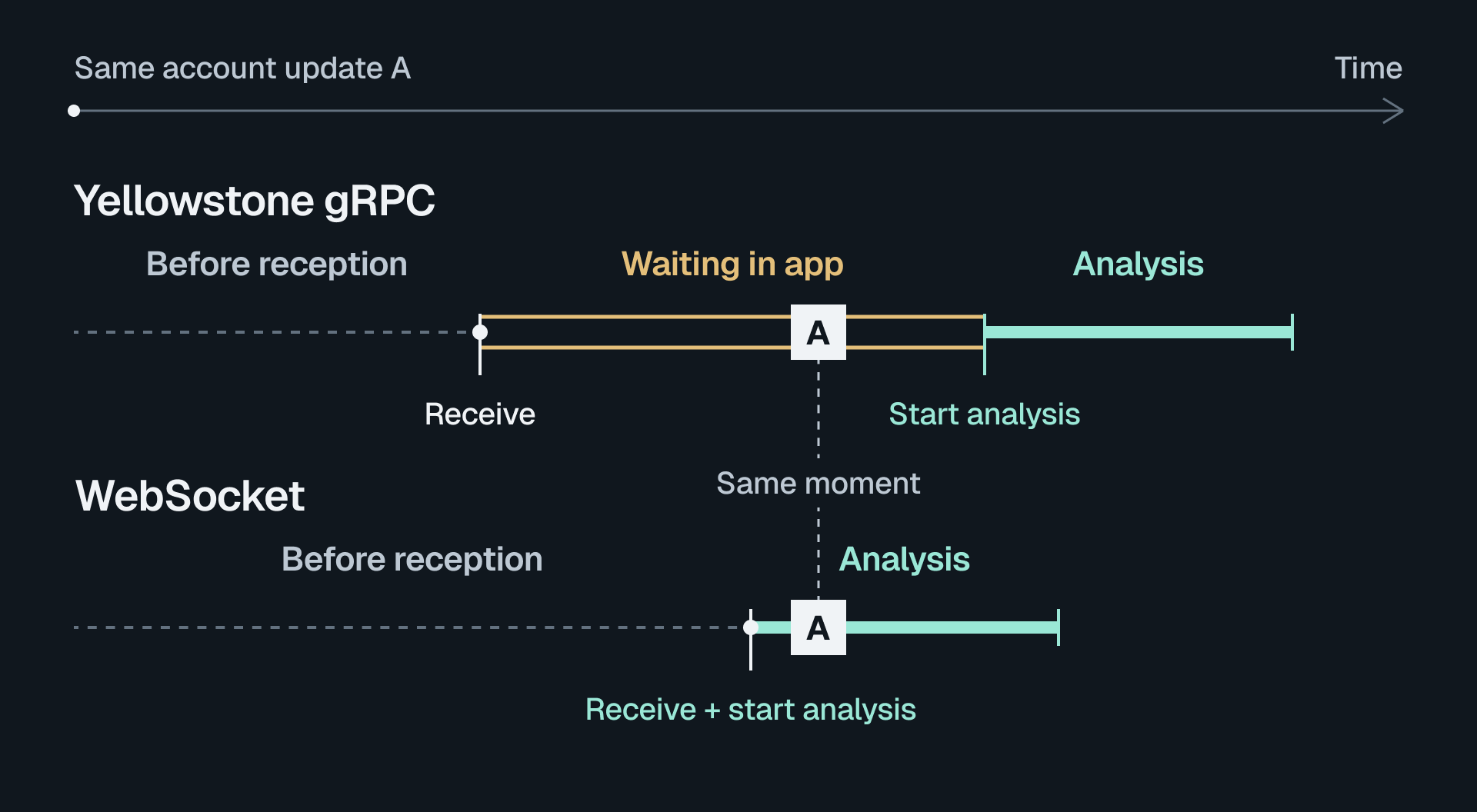
A client can receive an update first but wait for an earlier database write, allowing a later receiver to begin analysis first. In a continuous monitor, record three times for the same update:
t_receive when the receive callback begins, t_start when processing starts, and t_saved when storage completes. The green interval in the figure represents analysis; its right edge does not mark a completed save. Record t_saved separately, when the required save acknowledgement is received.Waiting in the app can reverse the start order
Use the same process's monotonic clock for all three points. In Node.js, you can use
performance.now(). Associate the measurements with a tracking number assigned within the connection, then calculate the differences below. This tracking number is for measurement; define replay deduplication separately. 19| Measurement | Calculation | Action when it grows |
|---|---|---|
| Wait before processing | t_start − t_receive | Inspect arrival rate, processing rate, and the longest wait, then adjust subscription volume or processing capacity |
| Analysis and storage time | t_saved − t_start | Identify time spent decoding, calling external HTTP services, or writing to the database |
| Reception to storage | t_saved − t_receive | Stop decisions based on stale state when the delay exceeds the application's tolerance |
For an illustrative record of
receive=100ms, start=125ms, saved=132ms, the processing wait is 25ms and analysis plus storage takes 7ms. In actual measurements, also compare arrival and processing rates over the same interval to distinguish a temporary burst from a sustained capacity shortfall.Place the three timestamps in code
This instrumentation example is separate from the connection-check CLI in Chapter 3. Call
onUpdate immediately on entry to the corresponding SDK callback to record the three times for the same update. It captures t_receive at onUpdate entry, so filtering performed before that call is excluded.typescript
import { performance } from "node:perf_hooks";
import { BoundedSerialInbox, type StopReason } from "./bounded-inbox.ts";
import { TimingSummary } from "./timing-summary.ts";

// Honor stop status and signal; queue health does not authorize decisions.
export function createMeasuredReceiver<T>(
  connectionId: string,
  analyseAndSave: (update: T, signal: AbortSignal) => Promise<void>,
  capacity = 256,
  now = () => performance.now(),
) {
  let sequence = 0n;
  const timings = new TimingSummary();
  const inbox = new BoundedSerialInbox<{
    traceId: string; update: T; t_receive: number;
  }>(capacity, async (job, signal) => {
    const t_start = now();
    await analyseAndSave(job.update, signal);
    const t_saved = now();
    timings.add({
      traceId: job.traceId, t_receive: job.t_receive, t_start, t_saved,
    });
  });
  return {
    onUpdate(update: T) {
      const t_receive = now();
      return inbox.offer({
        traceId: `${connectionId}:${++sequence}`, update, t_receive,
      });
    },
    stop: (reason: StopReason) => inbox.stop(reason),
    status: () => ({ ...inbox.status(), timings: timings.snapshot() }),
    whenIdle: () => inbox.whenIdle(),
  };
}
import { performance } from "node:perf_hooks";
import { BoundedSerialInbox, type StopReason } from "./bounded-inbox.ts";
import { TimingSummary } from "./timing-summary.ts";
// Honor stop status and signal; queue health does not authorize decisions.
export function createMeasuredReceiver<T>(
connectionId: string,
analyseAndSave: (update: T, signal: AbortSignal) => Promise<void>,
capacity = 256,
now = () => performance.now(),
) {
let sequence = 0n;
const timings = new TimingSummary();
const inbox = new BoundedSerialInbox<{
traceId: string; update: T; t_receive: number;
}>(capacity, async (job, signal) => {
const t_start = now();
await analyseAndSave(job.update, signal);
const t_saved = now();
timings.add({
traceId: job.traceId, t_receive: job.t_receive, t_start, t_saved,
});
});
return {
onUpdate(update: T) {
const t_receive = now();
return inbox.offer({
traceId: `${connectionId}:${++sequence}`, update, t_receive,
});
},
stop: (reason: StopReason) => inbox.stop(reason),
status: () => ({ ...inbox.status(), timings: timings.snapshot() }),
whenIdle: () => inbox.whenIdle(),
};
}The helpers are in
instrumentation/ in the same ZIP. Run node src/demo.ts in that directory to inspect the summary produced by two synthetic updates in an in-memory demo. It does not connect to ERPC or a real database, and its output times are not service latency measurements.In a real client, use a fresh
connectionId for each connection and read receiver.status().timings at a controlled interval outside the receive callback. The example capacity of 256 includes the active update. The helpers use neither synchronous per-update logging nor an unbounded history array. These summaries cover successful saves only; monitor failed, discarded, and unprocessed updates separately. analyseAndSave must resolve only after the required save acknowledgement. Handing a write to another queue is not t_saved.The return value of
onUpdate() indicates acceptance. true does not mean the update has been saved; false means it was not accepted. Completion of whenIdle() is not a success signal either; inspect the stop status and save acknowledgements. Cancellation does not undo a save that has already committed.On overflow or processing failure, the helper stops accepting updates, discards waiting work, and requests cancellation of the active handler. The caller must honor
decisionStopRequired and AbortSignal by stopping decisions that depend on continuity. Also call stop({ kind: "source-closed" }) when the source disconnects, and treat the unverified interval as recovery work in Chapter 6. The absence of a stop request does not establish initial consistency or authorize resuming decisions.This example measures within one process. It does not move processing to a separate CPU thread, reconnect, or recover gaps.
traceId identifies a measurement within a connection. SDK connection handling, Ping/Pong, update selection, and replay deduplication remain separate application work.These are application-side measurements; in this example, they begin at
onUpdate entry. When using a source timestamp such as created_at, establish what event it represents and account for clock differences; do not directly subtract UTC timestamps from monotonic-clock values. A small application queue also does not establish that the SDK or network has no backlog. 4 19Compare arrival times between delivery paths
To measure arrival differences between delivery paths, receive both subscriptions in the same process and record reception with the same monotonic clock. The origin of
performance.now() is the start of each Node.js process, so do not directly subtract values from separate processes, even on the same host. If the clock origins cannot be aligned, do not calculate an arrival-time difference between paths. You can still compare separate metrics computed within each client, such as the wait from reception to processing. 19For a concrete matching example, use
finalized for transactions on both paths. Convert the signature bytes delivered by Yellowstone's transactions subscription to a base58 string and match it to the logsSubscribe signature. Log arrival and the time when the transaction body becomes available, for example through getTransaction, remain separate metrics. getTransaction does not accept processed. 4 8 20For account updates, neither a public-key-and-slot pair nor identical data values uniquely identify the same write. Exclude one-sided and uncertain matches from arrival differences and count them separately. WebSocket includes
accountSubscribe with processed support and services that deliver Geyser data, so align commitment and record the source when comparing paths. 4 6 7Adjust workload and capacity
If processing remains slower than reception, reduce unwanted subscription volume or improve expensive work. Parallel processing must also prevent an older account state from being saved later and overwriting a newer state. A monitor that combines updates because it only needs the latest state must still preserve ordering and the treatment of provisional state.
| Control | What it limits | Evidence for changing it |
|---|---|---|
| Application queue | Number of pending updates or memory used to hold them | Buffer a temporary burst; do not hide a sustained shortfall by only increasing the queue |
| Receive message-size limit | Maximum size of one gRPC message | A size-limit error and a verified need for the payload justify adjustment within the memory budget |
| HTTP/2 receive window | Bytes that can be sent before the receiver grants further capacity | Investigate evidence of a flow-control limit and compare before and after under the same load |
A larger window does not accelerate database work. If
STREAM_GUARD_SLOW_READER is returned, investigate the network, SDK receive settings, and application backlog separately.Receiver placement is another improvement to consider. ERPC offers Shared and Dedicated service and describes pairing a dedicated Geyser node with ERPC Bare Metal on the same network. These are options for reducing the effect of shared resources and shortening the network path. Compare reception and processing with the same subscription, commitment, and measurement points, including busy periods, to assess the effect of a placement change. If the region-selection probe reports
9999ms, also check that inbound ICMP is allowed from the current probe sources listed in the official quickstart. 1 12 135. Preserve the first error and the earliest retry time
After a disconnect, save the first error before reconnecting. With ERPC, use the gRPC status and message together with any available
x-erpc-error-code, x-erpc-error-reason, and x-erpc-retry-at. The last field expresses the earliest retry time in Unix seconds. Retain a returned time across process restarts and do not retry before it. Even after that time, fix any remaining cause of the rejection first. 13| Observed symptom | First action |
|---|---|
| Cannot connect | Check the Dashboard's gRPC URL, TLS configuration, and the host's outgoing IP |
| Connected, but no target updates | Separate Ping/Pong from data, then investigate target activity, address, filters, and commitment |
ERPC_GRPC_INVALID_ARGUMENT with empty_filter | Do not resend the same request; specify the required target addresses in each filter |
too_many_addresses / address_not_allowed | Narrow the address list to needed targets / remove addresses Shared does not permit. Read the returned message for the applicable limit |
STREAM_GUARD_SHAPE_BLOCKS / STREAM_GUARD_SHAPE_ACCOUNTS_ALL | Remove the blocks subscription / correct the account selectors. Do not reconnect with the same conditions |
STREAM_GUARD_SLOW_READER | Retain the initial details and investigate the network, receive window, CPU, and processing backlog |
| A new connection closes immediately | Read the first error and saved earliest retry time, then stop rapid reconnection attempts |
Keep the original incident cause, latest connection closure, and earliest retry time in separate fields, with a connection-attempt identifier. Do not let a later close overwrite the first cause. During an ERPC pause, the same detail may not be returned again. Reconnection attempts themselves do not advance a penalty, but a rejected subscription must not be resubmitted without correction. 13
The following record uses invented values, not captured ERPC logs.
retryAt is a Unix timestamp in seconds; its origin and purpose differ from performance.now().json
{
  "exampleOnly": true,
  "firstError": { "code": "STREAM_GUARD_SLOW_READER" },
  "lastClose": { "event": "close" },
  "retryAt": 1800000000,
  "recoveryUnconfirmed": true
}
{
"exampleOnly": true,
"firstError": { "code": "STREAM_GUARD_SLOW_READER" },
"lastClose": { "event": "close" },
"retryAt": 1800000000,
"recoveryUnconfirmed": true
}These field names describe an application record, not necessarily SDK properties. Do not clear
recoveryUnconfirmed on reconnection until missing updates are accounted for. Record the completed-storage boundary and unverified interval separately, as described in Chapter 6.The additional information an SDK exposes depends on its implementation. Record unavailable codes or an unavailable earliest retry time as unknown; a missing time does not establish that no wait is required. If you cannot distinguish a rejection from a transient failure, stop automatic retries and check the initial logs and service conditions. The one-shot sample prints the exposed error and exits; it does not persist the earliest retry time or reconnect automatically. When the documented service conditions identify a transient failure without a specified pause, use capped backoff in a continuous client. 13
Error codes and current service conditions: https://erpc.global/en/faq/grpc/general/
6. Handle provisional state and recovery after an interruption
A
processed update may later be excluded from the adopted chain even while the connection stays open. Keep the provisional value shown early separate from the finalized value. Once the adopted fork finalizes, reflect its required data in the finalized value and discard or correct values from forks that were not adopted. If this handling is not implemented, you can choose to use only finalized state. 5 25Current Geyser and Yellowstone streams can contain multiple banks, the execution states of competing forks, for one slot. For updates that carry
bank_id, group them by (slot, bank_id) within each source connection so competing candidates are not mixed. Startup account updates and some slot notifications have no bank_id; handle them separately rather than inventing an identifier to merge them with bank-specific updates. The TypeScript field is bankId. It is a node-local identifier: its numeric order does not establish which state is newer, and the same value on another connection does not establish the same bank. 4 25Start the continuous client's recovery handling with three actions: record a disconnect or queue overflow, stop decisions that depend on update continuity, and display finalized state obtained over HTTP separately. Suppose updates A and B arrive in the same slot, but only A is saved before disconnection. The last received slot cannot express that B remains unsaved. Record the boundary whose storage is complete separately from intervals with unverified reception or storage. Isolate old pending updates so they cannot be applied unconditionally to newly retrieved state.
You can resume a current-value reference through another path, such as calling HTTP RPC
getAccountInfo with the account address and { "encoding": "base64", "commitment": "finalized" }. Record the response's context.slot and retrieval time, and distinguish the display, for example as “Finalized value retrieved by HTTP; stream recovery unverified.” The context.slot is the slot at which the request was evaluated, not the account's last update identifier or a stream restart cursor. Even at the same commitment, it cannot alone establish the boundary joining the snapshot and stream. 9| Recovery state | What you can do | Treatment of decision processing |
|---|---|---|
| Disconnect or queue overflow detected | Record the last stored result, first error, and unverified interval | Stop decisions that depend on update continuity |
| Finalized state retrieved over HTTP | Display the current value with its source, commitment, and reference slot | Do not mark earlier gaps or subscription continuity as recovered |
| A live update for the target arrives again | Record resumed delivery and continue receiving into an area reserved for recovery | Do not resume decisions merely because one update arrived |
This guide does not provide an implementation that reconciles an ERPC snapshot with the stream and resumes automated decisions. To define the conditions for resuming, establish these three points about the endpoint's guaranteed notification ordering and replay behavior.
| What to establish | Information needed |
|---|---|
| Finality and complete reception | Which notifications and ordering identify the adopted bank's finality and complete reception of the required updates for that bank |
| The snapshot-to-stream boundary | Which information associates the state obtained over HTTP with the updates to apply afterward, and whether that information remains valid across connections |
| Replay coverage | Whether from_slot replay is provided, the retained range, and the granularity of replayed updates: every write or only the last state within a bank 4 11 |
Consult the ERPC gRPC FAQ and official quickstart, and ask official support about conditions that are not documented. Do not transfer another service's ordering or replay guarantees to ERPC. Keep decisions that depend on continuity stopped until the client can determine that the required updates are stored and can be applied in the correct order. Prevent duplicate application where replay overlaps stored data; if full transaction history is required, recover the history missed during the interruption too. 12 13
Next, set
ACCOUNT_PUBLIC_KEY to an account your application needs and check that the pubkey in first_live_account matches. When building a continuous client, begin by recording the three timestamps for each update and retaining the first connection error. Before adding automatic recovery, establish the three endpoint specifications above and implement the recovery conditions.Appendix: Reading transaction filters
Use this appendix when moving from monitoring one account to subscribing to
transactions. The prose uses protobuf field names; the TypeScript example uses the property names in the pinned SDK.Yellowstone defines how conditions combine; ERPC's service conditions determine which targets and limits the endpoint accepts. ERPC Shared does not accept an empty transaction filter without addresses. Remove high-volume addresses that Shared does not permit. Replace A–D below only with targets needed by your application. If
too_many_addresses or address_not_allowed is returned, correct the request before resending it. Do not use all transactions or a high-volume program-wide subscription as a connectivity test. Current limits and reason codes: https://erpc.global/en/faq/grpc/general/The sample's
@validators-dao/solana-stream-sdk@4.0.0, backed by @triton-one/yellowstone-grpc@10.0.0, uses these properties in SubscribeRequestFilterTransactions. Each has the type string[].| Protobuf field | TypeScript property in the pinned SDK |
|---|---|
account_include | accountInclude |
account_exclude | accountExclude |
account_required | accountRequired |
Combine conditions within one named filter
account_include: [A, B] matches transactions containing A or B. account_required: [A, B] requires both. account_exclude: [D] excludes transactions containing D. Conditions across fields are combined with AND.Use the following value for
SubscribeRequest.transactions in a transaction consumer. Define A–D beforehand as string variables holding actual public keys. This is a request fragment without transaction reception logic; the one-account CLI in the main guide does not handle transaction updates.typescript
import type { SubscribeRequest } from "@validators-dao/solana-stream-sdk";

const transactions: SubscribeRequest["transactions"] = {
  watched: {
    accountInclude: [A, B],
    accountExclude: [D],
    accountRequired: [C],
  },
};
import type { SubscribeRequest } from "@validators-dao/solana-stream-sdk";
const transactions: SubscribeRequest["transactions"] = {
watched: {
accountInclude: [A, B],
accountExclude: [D],
accountRequired: [C],
},
};watched names the filter. These conditions produce the following outcomes.- A and C: passes; include and required match, and D is absent.
- B, C, and D: excluded because D is present.
- A only: does not pass because C is absent.
- C only: does not pass because neither A nor B is present.
Any matching named filter can deliver the update
Multiple named filters in the same subscription category match as OR. Separate filters for A and B therefore deliver transactions containing only A as well. To require both, put them together in one filter's
account_required.A match establishes that the transaction's account set satisfies the filter. Validate the intended program call, instruction success, and asset movements separately using the transaction and execution results.
Official specification: https://docs.triton.one/solana/real-time-streaming/dragon-s-mouth-grpc
Protobuf definition: https://github.com/rpcpool/yellowstone-grpc/blob/b9a4f56a43a1858c63bfe8c3904b98ef416ae1a9/yellowstone-grpc-proto/proto/geyser.proto
Pinned type definition:
SubscribeRequestFilterTransactions in the installed node_modules/@triton-one/yellowstone-grpc/dist/types/grpc/geyser.d.ts. Solana Stream SDK re-exports this type.References
- ERPC Geyser gRPC
- Anza Geyser Plugins
- Solana Account Structure
- Yellowstone protobuf definition
- Solana Confirmation & finality
- Solana accountSubscribe
- Triton WebSocket
- Solana logsSubscribe
- Solana getAccountInfo
- Solana Tokens
- Triton Dragon's Mouth
- ERPC quickstart
- ERPC Geyser gRPC FAQ
- Solana Terminology
- gRPC Flow Control
- Tokio mpsc
- Tonic message size limit
- gRPC Introduction
- Node.js 24 Performance measurement APIs
- Solana getTransaction
- Solana Account Types
- Official Yellowstone TypeScript example
- Solana getTokenAccountsByOwner
- Protocol Buffers Overview
- Solana Alpenglow
- gRPC FAQ
- Methods supported by ERPC Unlimited Endpoint